
Software
1. These blackjack software analysis tools can be acquired through this site
2. Most require a Microsoft Windows environment to use
3. A listing preceded by an asterisk (*) means a program will be installed for use
4. A Windows console executable (.exe) does not need to be installed to use
5. All are 32-bit programs
6. GUI programs were developed on an older version of Windows and require a minimal user effort to register ActiveX controls for them to work in newer Windows versions. Windows ActiveX controls are no longer supported on newer versions by default, but still are usable.
7. Any listing may be acquired for $20.00
8. Payments made through PayPal. Email kc@bjstrat.net to arrange.
***
You can choose to just make a donation to help support the cost of this site. Make donation to PayPal username kc@bjstrat.net after logging in to PayPal by choosing 'Send'. If you don't have a PayPal account one can be opened at PayPal. Please choose dollars as currency for whatever donation you may choose to make.
***
The truth about blackjack is that it is beatable by counting. Its weakness is that it can subject you to long streaks where improbably most everything goes wrong while mostly nothing goes right. It's better to learn this virtually through software rather than in reality.
GUI Programs
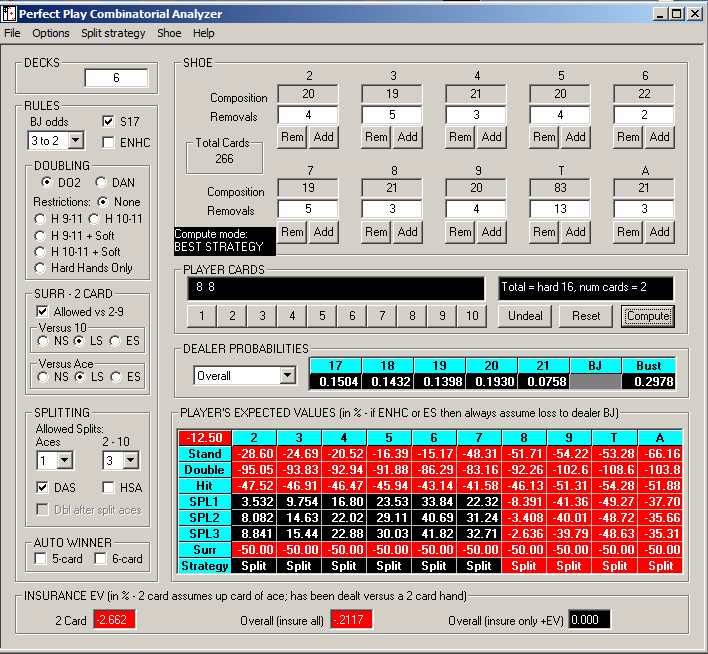
* cdca (Composition Dependent Combinatorial Analyzer) desktop graphical user interface version
Requires Microsoft Windows Environment. This is essentially the same as the online version in the Programs section of this website.
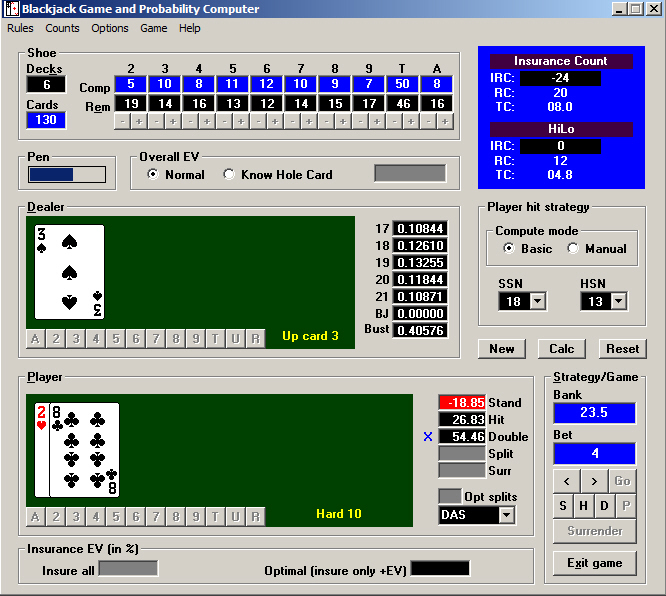
* tdca (Total Dependent Combinatorial Analyzer) - Blackjack Game and Probability Computer
Requires Microsoft Windows Environment. The focus of this program is on total dependent basic strategy (TDBS). It uses TDBS for overall expected value computation. It has the ability to alter TDBS to compute individual hands. It can be used as a computer to calculate combinations of partial player and or dealer hands (examples: 1 player card versus 1 dealer card, 1 player card versus 0 dealer cards, and more.) It can compute values assuming dealer hole card is known. It can compute using any valid shoe composition user inputs. User can enter and manage any number of counting systems. Up to 2 counting systems can be displayed. Change of shoe composition results in update of displayed counts' running and true counts. Counting systems can be swapped at any time. User can play random game of 1 player versus dealer and view up to date computations as game proceeds. It has keyboard shortcuts useful for, among other things, input and computation in game mode.
The help system now opens in a browser. Previous release required WinHelp32 support which is no longer supported by Microsoft. Some minor changes from previous release are included in this release.
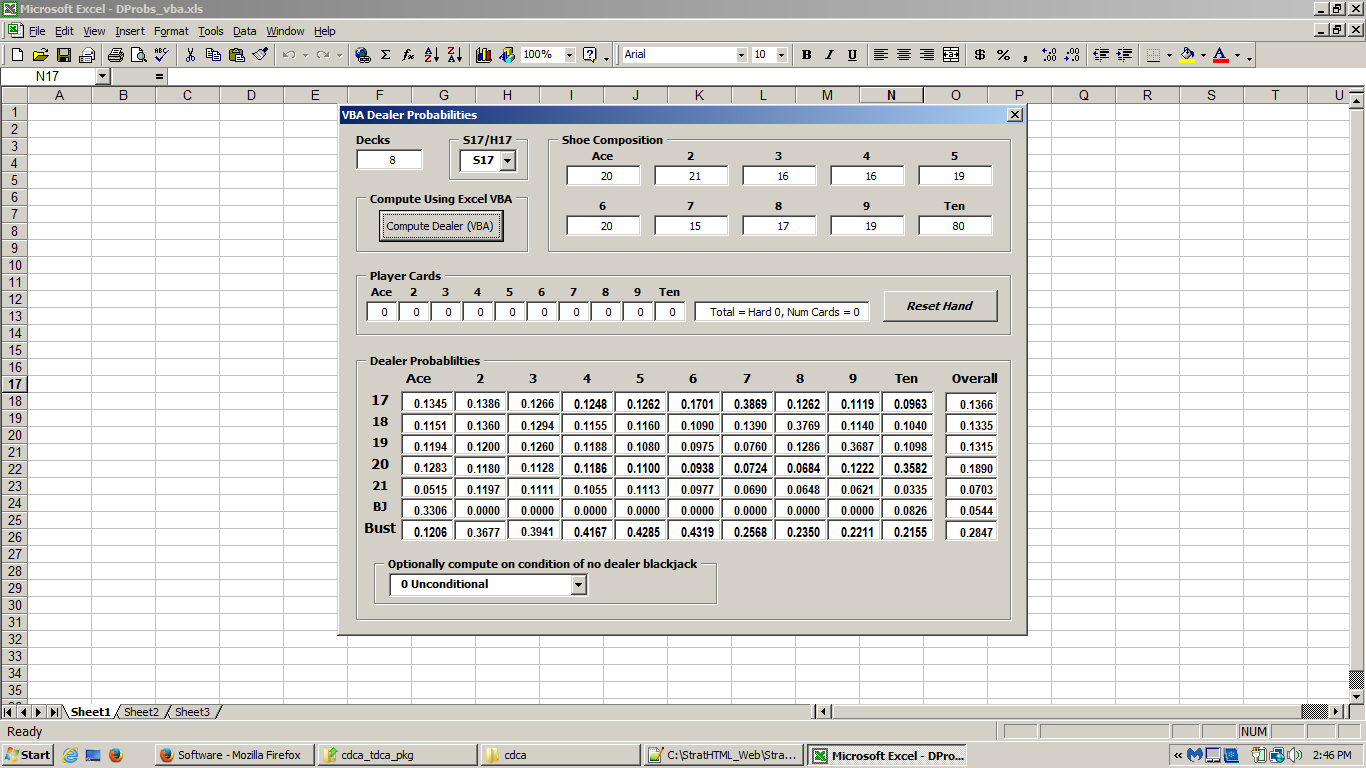
Excel spreadsheet with VBA souce code to compute dealer probabilities
Ability to compute dealer probabilities is the most important component of writing an efficient blackjack combinatorial analyzer. This is a blank Excel spreadsheet with an executable macro written in VBA (Visual Basic for Applications.) Macro computes dealer probabilities. Options are dealer stands/hits soft 17. Computation can be conditional, assuming dealer does not have blackjack or unconditional. Shoe composition can be directly input if desired to the limits of the input number of decks. Cards in player hand can also optionally be input. Macro name is Compute. Macro is run from Tools/Macro/Macros... menu.
Object oriented source code has been translated into VBA. Macro can also be run by opening VBA editor. Source code can also be viewed in VBA editor and is very efficient, computing all upcards at once. Dealer probabilities by themselves are not useful except possibly in conjunction with running a simulation.
Console Programs
- cdca (Composition Dependent Combinatorial Analyzer) - This is the console version of cdca. The online version can be accessed from the 'Programs' navigation link. The console version is free for personal use. To download click one of the download links below.
Last update 05-15-2015
- fixed an error that occurred when doubling was restricted to hard 9 and/or 10 and 11 plus soft hands (05-15-2015 both Windows and Linux)
Previously updated
- reverted to a previous version of a comparison function since it was discovered to be more efficient than a newer version while working with the version that computes variance/standard deviation (05-10-2015 both Windows and Linux)
- more efficient method of creating a list of shoe removal states. (09-05-2014 both Windows and Linux)
- fixed typo where 6 card auto winner option was displayed as 5 card auto winner. (06-05-2014 both Windows and Linux)
- increased speed a bit by eliminating some redundancy in the computation of dealer probabilities. (03-14-2014 both Windows and Linux)
- Improved user interface for inputting rules and removals (02-01-2013 Windows version, 02-05-2013 Linux versions)
- Conditional/unconditional values for an individual player hand or dealer probabilities displayed without recalculation (02-01-2013 Windows version, 02-05-2013 Linux versions)
- Fixed error in basic pre-split strategy EV output. This error has been present in recent releases but not in earlier releases. (02-01-2013 Windows version, 02-05-2013 Linux versions)
- Reworked internal data handling to use linked lists. Overall EV calculations are a bit faster. (02-01-2013 Windows version, 02-05-2013 Linux versions) - Windows (cdca console) - Run by executing an uninstalled Windows .exe file
- Windows dll version (added 09-05-2014) - This version is the same as the above console version but it requires a Windows dll. It also has an option to simulate either composition dependent basic strategy or best strategy for a single player versus dealer. Best strategy cannot be practically simulated by a program that does not have the capability of computing strategies for any shoe composition as cards are dealt since it is required to determine each and every strategy decision as cards are randomly dealt. A best strategy simulation would have to pause to simulate an an overwhelming number of rounds to come up with each strategy decision, whereas a combinatorial analyzer can come up with each decision much more effciently by simply computing what is best. This CA simulation could be made to be more efficient. However, at this time it uses the same methods as the above console version, which computes values for all up cards at once. More efficiency would come by optionally limiting all computations to a single up card, which is all that is required in the simulation. The user needs to input a value for number of cards dealt before reshuffle that ensures cards never run out. If an out of cards condition is encountered, the sim is aborted at that point. (Previously this caused the program to crash.)
- cdca (Variance/standard deviation version) - This version of cdca computes variance and outputs standard deviation, which is the square root of variance, while also outputting expected values. It is much slower than the above console version because computing variance for splits takes so much longer. I have successfully computed overall EVs for a single deck on a computer with 2 GB ram and also a couple of calculations for individual hands where 2 splits are allowed. The overall single deck calculation takes about 20 minutes whereas the same calculation takes a second or two for the version that computes only EVs and not variance. Hopefully the program is just slow and will not crash given enough memory but there are no guarantees. Any computation that does not involve splitting is not a problem.
- Original release 07-25-2012
Last update 05-05-2015
- fixed an error that occurred when doubling was restricted to hard 9 and/or 10 and 11 plus soft hands (05-15-2015)
Previously updated 08-11-2012
- faster, but computing variance for splits still takes a lot of time
- fixed error in display of values when surrender was chosen as a rule option (07-31-2012)
- surrender values are now displayed for 2 card player hands when surrender is a rule (08-01-2012)
- memory now is cleared after every player hand is computed to reduce prolonged memory clearing sluggishness after an overall calculation (08-05-2012)
- overall variance now is computed and STD DEV displayed for overall calculations (08-11-2012) - Linux - There are 2 downloads available. One was compiled with gnu c++ compiler version gcc-4.4.7 and the other with version gcc-4.6.3, Linux versions may work on systems with support for a later version compiler but may not work on systems that support an earlier version compiler.
- Optimal Expected Values for a single split - This program computes the most optimal expected values for splitting a pair for common rules variations. It only computes splits and does not compute anything else. It does not compute resplits or expected values for stand/double/hit for any non-pair hand. Optimal split computation takes more computer resources than computing using a fixed strategy as is done in cdca above. On a computer with 2 GB ram I am able to compute optimal split expected values for a pair of aces and the rule of allowing split aces to be hit for 100 decks. This is about as an intensive calculation as exists within the scope of the program so it appears that 2 GB ram should accommodate most any input. There is no error checking in the program so it will crash if it exhausts available memory. A brief description of the way the program works is that for each possible hand #1 it computes stand for each optimal computation of hand #2. After that it uses the hand #1 stand values it has already computed to compute double, hit, and strategy in hand #1 and this links to the optimal values in hand #2 which have also already been computed. It still takes a lot more computing than a fixed strategy calculation does though. I cannot guarantee that the output of the program is right. However, a strong indication that it is right is that when a large number of decks is input the expected values approach those of a fixed strategy, which is what is expected.
- Original release 06-08-2012
Updated 11-27-2024
- strategy for doubling with no knowledge of up card was erroneously referenced when up card is known Updated 12-05-2024
- eliminated some unnecessary computation; 20% faster Updated 01-30-2025
- fixed problem: change dealer stands/hits soft 17 after computation without change of #decks output EVs relative to unchanged S17/H17